
Building offline reading in Glimshelf.
We built Glimshelf so readers can take books from a self-hosted library onto an iPhone or iPad. Here is how we approached two parts of that work: preparing books for a trip and keeping reading progress intact when a server returns.
A download indicator does not tell a reader whether their next book will open in Airplane Mode. It also does not tell them what will happen to their place when they reconnect.
The pack has to prove it is ready.
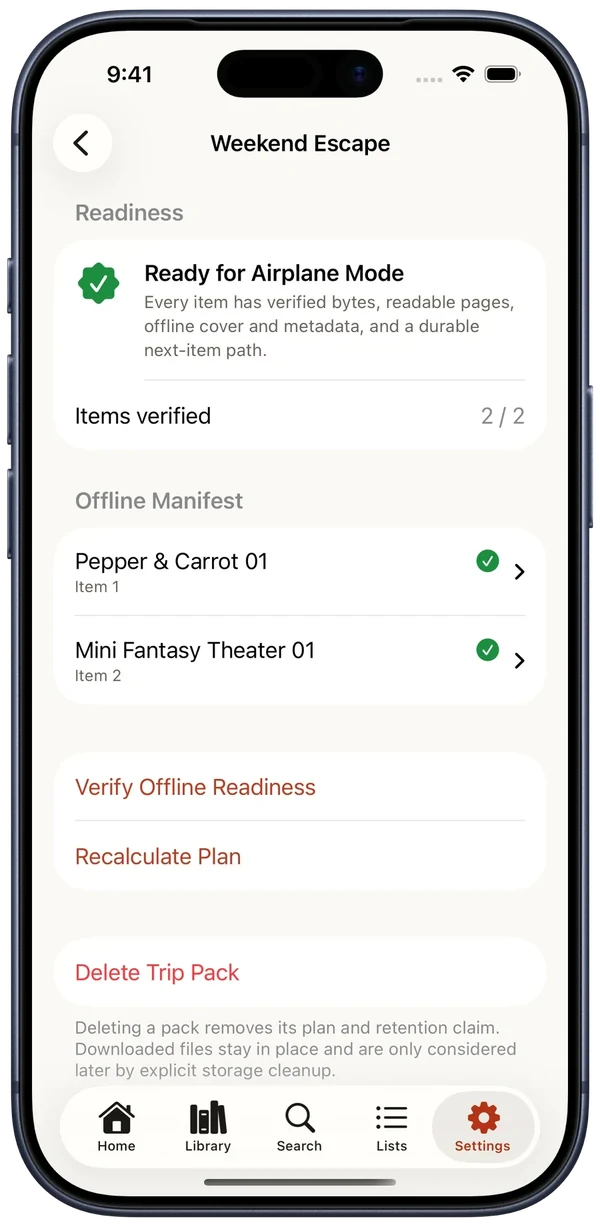
In Glimshelf, a reader chooses books or series for a Trip Pack. Before downloading, the app estimates the space needed and shows whether the device has enough room. When the downloads finish, the pack checks each selected book against its current plan. It looks for a completed, nonempty file, readable pages, cover and book information available offline, and the expected next book in the reading order.
The Ready state depends on those checks. If a file disappears or a pack changes, the app checks again rather than trusting an old Ready label. The same checks can be made after an app relaunch without asking the server for the online catalog. A reader can verify the pack before leaving home, then open the books without a connection.
Save the reading place on the device first.
A reader should be able to turn a page while offline. Glimshelf saves that progress locally and holds an update for a connected Komga or Kavita library. The queue pauses when there is no network and tries again when the connection returns. A local file or an OPDS library without a compatible progress API still has a local reading place; Glimshelf does not claim to sync it to a server that cannot receive it.
Reconnecting can reveal a second reading place. Someone may have read the same book on another device while this one was offline. Glimshelf compares the server's current position with the position this device last saw. If the server has not advanced, the local change can be sent. If the two positions changed independently and the app cannot establish which to keep, it shows both positions and lets the reader choose. Page number alone is not enough to decide that a larger number is the right one.
What this means for an app project.
Offline support affects more than a download button. The app needs a way to say what is available, handle insufficient storage and missing files, save work before the network responds, and explain conflicts when another device has changed the same information. We worked through those cases in our own app because a reader needs to know whether it will work before they lose their connection.
Try Glimshelf in public beta or read about the app. If you are planning an iPhone or iPad app with offline work, see how Nimblor scopes app projects.